







A credit card reader is a small, portable device that typically connects to a phone or tablet to accept card payments through an app. A credit card machine (often called a credit card terminal in the US) is a standalone device that processes payments, connects to your network, and can print receipts. Both handle chip, swipe, and Tap to Pay transactions, and the real difference comes down to mobility, setup, and how you run your business.
It’s also worth calling out a quick terminology note: In the UK, “card machine” is the go-to term, while in the US, you’ll hear “credit card terminal” used interchangeably.
This guide breaks down everything you need to know about credit card readers vs machines. We cover in-depth definitions, side-by-side comparisons, and a decision frame for selecting the right solution. You’ll also learn about Tap to Pay, a third option worth considering. Tap to Pay (on iPhone and Android) lets you accept contactless payments with just your phone. Depending on how you operate, it could change the equation entirely.
Key Takeaways
- A credit card reader is a compact device that pairs with a phone or tablet, while a credit card machine (or terminal) is a standalone, all-in-one payment device with built-in connectivity and checkout features.
- Credit card readers are typically best for mobile businesses, pop-ups, field services, and lower-volume sellers. Credit card machines are better suited for fixed-location businesses, busy counters, and higher-volume environments.
- Readers usually have a lower upfront hardware cost, but the right long-term setup depends on your transaction volume, workflow, and checkout needs, not just the device price.
- Tap to Pay on iPhone and Android has become a legitimate third option for many small businesses, allowing merchants to accept contactless payments directly on their phone without extra hardware.
- The best setup depends on how and where you take payments. This guide walks you through a decision framework to help you select the best solution for your business.
What Is a Credit Card Reader?
A credit card reader is a compact, portable device that connects to a smartphone, tablet, or computer to process card payments through a payment app.
Most readers connect over Bluetooth or plug in via USB-C or Lightning, while some support Wi-Fi and, in rare cases, cellular. They handle chip insert, swipe, and tap payments. Unlike full terminals, readers usually don’t have screens or printers. Your phone or tablet handles the interface, receipts, and transaction management. It’s a simple setup that keeps hardware light and flexible.
A common question merchants have is: Can a credit card reader work without Wi-Fi? In most cases, yes, but it still needs internet access through something. Readers typically connect via Bluetooth to a phone or tablet that has Wi-Fi or cellular data. Some also offer offline mode, which lets you temporarily store transactions and sync them for authorization once you’re back online. Now that you know what a card reader is, next, we’ll talk about how a credit card machine differs.
What Is a Credit Card Machine?
A credit card machine is a standalone, all-in-one device that processes card payments without needing a connected phone, tablet, or computer.
Credit card machines typically include a screen, keypad, receipt printer, and direct connectivity (Wi-Fi, Ethernet, or cellular). And just like credit card readers, card machines also accept chip, tap, and swipe payment methods. But unlike readers, which are attached to a phone, tablet, or computer, credit card machines operate independently as a standalone device. Note that “credit card machine” and “credit card terminal” are used interchangeably in the US. Some merchants also call them “POS terminals” when they include built-in software.
You’ll generally see three types. Countertop machines stay plugged in at a fixed checkout. Portable or wireless models run on a battery and move around within a store or restaurant. Mobile terminals use cellular connections, so you can take payments without relying on local Wi-Fi. For example, a handheld smart terminal works well for on-the-go selling, while an all-in-one terminal is built for a full-service checkout at the counter. With both definitions on the table, here’s a side-by-side look at the real differences.
What Is the Difference Between a Credit Card Reader and a Credit Card Machine? The Side-by-Side Comparison
A credit card reader pairs with a phone or tablet to take payments on the go, while a credit card machine is a standalone device that handles the full checkout experience directly on the hardware. Both accept tap, chip, and swipe payments, but they’re designed for different ways of running your business.
| Feature | Credit Card Reader | Credit Card Machine |
|---|---|---|
| Standalone or paired | Requires a phone, tablet, or computer | Fully standalone — no extra device needed |
| Connectivity | Bluetooth, USB, sometimes Wi-Fi | Wi-Fi, Ethernet, or cellular (built in) |
| Receipt printing | Digital only (email/SMS) | Built-in printer (most models) |
| Chip/swipe/tap | Yes (most modern readers) | Yes |
| Typical hardware cost | Lower (often $0–$100) | Higher (often $200–$700+) |
| Best for | Mobile, on-the-go, low-volume, pop-up | Fixed location, high-volume, customer-facing checkout |
| Setup time | Minutes — pair via app | Minutes to a few hours depending on connectivity setup |
| Power source | Battery (charged via paired device or USB) | Plug-in or rechargeable battery |
Note: despite the differences, both accept the same modern payment methods (EMV chip, magstripe, contactless tap, and mobile wallets like Apple Pay and Google Pay), so regardless of what you choose, you won’t be limited by your customers’ preferred payment methods.
One important thing to remember is that the device itself usually does not determine your processing rate. In most cases, the percentage you pay per transaction is set by your processor and pricing model, not whether you use a reader or a standalone terminal.
Here’s how credit card machines and readers compare across key features:
- Standalone vs paired – Credit card machines are independent; they don’t need to be connected to a device to function. Readers, on the other hand, must be connected to a smartphone, tablet, or computer to run the payment app.
- Connectivity – Readers typically use Bluetooth or a wired connection to your device. Machines connect directly to the internet through Wi-Fi, Ethernet, or cellular.
- Receipt printing – Many credit card machines support built-in receipt printing. Readers don’t have a built-in printer, so they send digital receipts by default.
- Chip, swipe, and tap support – Both options support all major payment methods, including contactless payments.
- Hardware cost – Readers are typically more affordable upfront. Machines cost more but bundle in additional hardware and capabilities.
- Best use cases – Credit card readers work well for mobile businesses, pop-ups, and low-volume setups. Machines are better for busy counters and customer-facing environments.
- Setup time – A reader is quicker to get up and running because all it takes is attaching it to the device and pairing it with the app. Machines may take longer if you’re configuring networks or integrating with other systems.
- Power source – Machines either plug in or use a built-in battery for wireless use. Most readers are battery-powered or USB-powered, depending on the model.
When it comes to payment card reader costs, it depends on your setup. Costs can vary widely, but sources like Forbes report that basic mobile card readers can cost as little as $10 to $30, while more advanced smart terminals and POS hardware can run several hundred dollars, depending on the provider and features you need.
Credit Card Reader vs Credit Card Machine vs Credit Card Terminal: Are They All the Same?
Sorting out the terms “credit card reader,” “credit card machine,” and “credit card terminal” can be confusing because different regions and providers use them interchangeably. What one vendor calls a terminal, another might call a machine. Add in UK terminology and newer options like Tap to Pay, and it’s easy to mix them up. Here’s the simple way to think about it: “credit card terminal” and “credit card machine” usually mean the same thing in the US; “card machine” is more common in UK and Australian English. That being said, these terms have their nuances. Consider the following:
| Term | What It Usually Means |
|---|---|
| Credit card reader | Compact device that pairs with a phone/tablet |
| Credit card machine | Standalone all-in-one device (US and UK) |
| Credit card terminal | Same as a credit card machine (more common in the US) |
| POS system | A broader system combining hardware + software for sales, inventory, and reporting |
| Tap to Pay (on phone) | Software that turns a smartphone into a contactless reader — no extra hardware |
| mPOS (mobile POS) | A mobile app + reader (or Tap to Pay) acting as a portable point of sale |
The good news is you don’t have to pick just one path. Platforms like Kurv support all of these setups, so you can choose what works best for your business and switch as you grow. You can accept tap payments using Tap to Pay on your phone, run transactions through a mobile payment app like the Kurv Merchant App, manage everything in the merchant portal, or use dedicated hardware when needed. The experience stays connected across devices, so whether you’re selling in person, on the go, or at a fixed checkout, your payments flow through one system.
What About Tap to Pay? The Third Option
Tap to Pay turns a smartphone into a contactless card reader, eliminating the need for a separate reader or machine for these types of transactions. For many small businesses, it’s a modern third option that sits right between the two.
Here’s how it works. Most smartphones already have NFC built in, which is the same tech behind contactless cards. When a customer taps their card or phone, your payment app receives the signal and processes the transaction right on your device. No extra hardware, no pairing, no setup beyond the app.
What can you accept?
- Contactless credit and debit cards
- Mobile wallets like Apple Pay and Google Pay
- Other NFC-enabled wallets
What can’t it handle?
- Chip insert (EMV)
- Magstripe swipe
- Non-NFC cards, including some older cards or certain HSA/FSA cards
It’s a great fit if you’re:
- Running a solo business or side hustle
- Selling at pop-ups, markets, or events
- Offering mobile services like home visits or field work
- Already using your phone or tablet to take payments
Kurv supports Tap to Pay directly through the Kurv Merchant App, so you can start accepting contactless payments without buying anything extra. It’s also designed to support PCI compliance when used with certified payment providers like Kurv, ensuring customer card data stays secure and your business stays covered. Now that you’ve seen all three options, let’s look at how to decide which one actually makes sense for your business.
How to Choose Between a Credit Card Reader and a Credit Card Machine
Here’s the simple way to decide: choose a credit card reader if you’re mobile, low-volume, or just starting out. Go with a credit card machine if you have a countertop checkout, steady volume, or need built-in receipt printing. Consider Tap to Pay if you want the lowest-friction setup with no extra hardware.
Think through it like this:
- Where do you take payments most often?
- At a single fixed location → A credit card machine makes checkout faster and more consistent. It stays plugged in, always ready, and keeps your counter setup clean.
- On the go or at multiple locations → A credit card reader or Tap to Pay gives you flexibility. You can take payments anywhere without lugging around bulky hardware.
- Both → A hybrid setup works well. Use a machine at your main checkout and a reader or Tap to Pay for line busting, events, or overflow.
- Do you need to print physical receipts at the point of sale?
- Yes → A credit card machine with a built-in printer is the easiest route. No extra steps or devices needed.
- No (digital receipts work) → A reader or Tap to Pay keeps things simple. Email and SMS receipts are faster and reduce paper use.
- What’s your monthly transaction volume?
- High and steady → A credit card machine tends to hold up better in busy environments and can be more efficient over time. It’s built for speed, durability, and back-to-back transactions.
- Low or seasonal → A reader or Tap to Pay keeps upfront costs low. You’re not investing in hardware you’ll only use occasionally.
- Do you already use a smartphone or tablet at the point of sale?
- Yes → You’re already set up for Tap to Pay or a reader. Just add the app or pair the device, and you’re good to go.
- No → A credit card machine is simpler. Everything you need is built in, so there’s less to manage.
- Do you need to accept payments in low-connectivity locations?
- Yes → Look for a credit card machine with cellular support. That way, you can keep taking payments even when a connection is spotty.
- No → Either option works fine as long as you have reliable Wi-Fi or cellular through your device.
If you’re still unsure, start with the setup that matches how you take payments today. You can always layer in another option as your business grows.
Which Is Best for Your Business Type?
The right setup depends on how and where you take payments. Fixed, high-volume environments usually benefit from credit card machines. Mobile or service-based businesses lean toward readers or Tap to Pay. Many businesses land somewhere in between and use a mix.
Retail Stores
Most retail stores do best with a credit card machine at the counter. It keeps checkout fast, gives customers a clear display, and supports steady foot traffic. During busy periods, adding a portable reader or Tap to Pay helps you move lines faster and capture sales wherever you are on the floor.
Restaurants and Bars
Pay-at-the-table is what customers expect at many restaurants and bars. A portable reader or handheld machine lets staff take payments right where the customer is, which speeds up table turns and improves the experience. Fixed countertop terminals still have a place for quick service, but flexibility usually wins here.
B2B and Professional Services
For B2B and pro service firms, payments often occur at the front desk or via invoices. A credit card machine is best for in-person payments, while a virtual terminal is often the better option for phone payments or sending invoices. Readers tend to matter less unless your team is out in the field.
Field Services
If you’re meeting customers on-site, mobility is everything. A credit card reader or Tap to Pay lets field service businesses collect payment immediately after the job, without having to chase invoices later. Fixed machines don’t really fit this model. The goal is simple: get paid before you leave.
Hospitality
Hotels and venues usually need a mix. A countertop machine works well at the front desk for check-in and check-out. At the same time, portable readers are useful for poolside service, events, or on-property dining. This kind of setup gives you flexibility without slowing things down. If your business spans multiple scenarios, don’t overthink it. Start with your primary use case, then layer in additional tools as needed.
Cost Comparison: Credit Card Reader vs Machine
Credit card readers typically cost $0 to $100 in hardware, while credit card machines often range from $200 to $700 or more. Processing fees are generally the same for both.
Here’s how the costs break down:
- Hardware cost (one-time) – Readers are the most affordable way to start. Many providers offer them free or at a low cost, especially if you’re new. Machines cost more because you’re getting a full device with a screen, keypad, printer, and built-in connectivity.
- Processing fees (per transaction) – Whether you use a reader or a machine, your rates depend on your provider, pricing model, and transaction type (in-person vs keyed-in).
- Monthly fees – Some providers charge monthly platform or merchant service fees, while others bundle costs differently. Kurv takes a more transparent approach with clear, tiered pricing and optional dual pricing.
- Optional add-ons – These are the smaller costs that add up over time. Think receipt paper for machines, charging docks, replacement cables, or protective cases. Readers tend to have fewer add-ons, while machines may require more ongoing supplies.
A Note on Payment Processing Volumes
At lower volumes, a reader or Tap to Pay usually wins on cost. You’re keeping hardware expenses minimal and only paying as you go. But as transaction volume grows, the conversation changes. A credit card machine won’t reduce your base processing rates, but it does become the foundation of a smoother, faster operation.
According to the 2025 Federal Reserve Diary of Consumer Payment Choice, consumers now make an average of 48 payments per month, with credit cards accounting for 35% of payments and mobile payments making up 23% of transactions. In that environment, a payment terminal becomes less of a nice-to-have and more of an efficiency tool. It helps businesses process payments quickly and reliably, which matters as younger consumers increasingly expect fast, contactless, and mobile-friendly checkout experiences. At a busy counter, fast and dependable Tap to Pay acceptance can make the difference between a smooth checkout and a frustrated customer.
Capabilities Compared: What Each Device Can Actually Do
At a high level, all three options let you accept modern payments. Where they differ is in how they handle edge cases such as offline transactions, receipts, and built-in checkout functionality.
| Capability | Credit Card Reader | Credit Card Machine | Tap to Pay |
|---|---|---|---|
| Chip card (EMV insert) | Yes | Yes | No |
| Magstripe swipe | Some models | Yes | No |
| Contactless tap (NFC) | Yes | Yes | Yes |
| Apple Pay / Google Pay | Yes | Yes | Yes |
| Manual key-in entry | Through app | Yes | Through app |
| Print physical receipt | No (digital only) | Yes | No (digital only) |
| Works offline | Limited (depends on app) | Some models | No |
| Built-in customer display | No | Yes | Phone screen |
| PCI-compliant out of the box | Yes (with certified provider) | Yes (with certified provider) | Yes (with certified provider) |
A Note On Security And Compliance
When used through certified providers, all three methods are built to support PCI Security Standards for handling card data. That means sensitive card data is encrypted and handled in accordance with strict guidelines. It’s also worth noting the role of EMV. Chip-enabled transactions help reduce fraud liability for in-person payments, a shift supported by organizations such as EMVCo. So, using EMV-capable devices (like readers and machines) provides stronger protection than older swipe-only methods.
How Kurv Helps You Accept Payments via Reader, Machine, or Tap to Pay
Kurv covers all your bases, whether you’re looking to use a credit card reader, machine, or Tap to Pay. Here’s why Kurv gives you an edge:
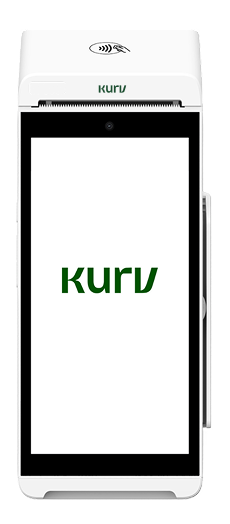
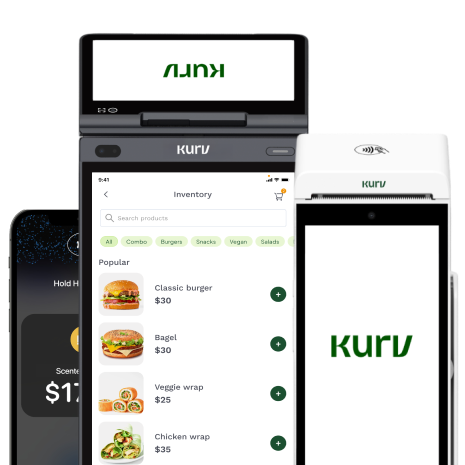
- Kurv’s hardware lineup includes a Handheld Smart Terminal (portable, handheld machine) and an All-in-One Terminal (countertop machine with everything built in)
- The Kurv Merchant App turns your iPhone or Android into a Tap to Pay device — free, no extra hardware
- Every Kurv merchant account includes the Kurv Merchant Portal (unified platform for payments, reporting, customer management, invoicing) and a free virtual terminal
- Transparent, tiered pricing with dual pricing options — no surprises
- Auto-approvals for many low-risk businesses, mostly self-serve onboarding, no aggressive sales pressure
- 24/7/365 US-based support in English and Spanish
Ready to Start Accepting Payments?
Pick the device that fits your business today, and know that Kurv supports you as you grow.

Frequently Asked Questions
Is a credit card reader the same as a credit card terminal?
No. A credit card reader is a small device that pairs with a phone or tablet, while a credit card terminal (also called a credit card machine in the US) is a standalone, all-in-one device. They serve the same purpose but work in different ways.
Do I need a credit card machine for my small business?
It depends on how you operate. Fixed-location, high-volume businesses or those that need printed receipts usually benefit from a machine. Mobile, low-volume, or solo operators often do just fine with a reader or Tap to Pay.
Can I use my phone as a credit card machine?
Yes. With Tap to Pay, your smartphone can accept contactless payments without extra hardware. Kurv offers this through the Kurv Merchant App, but keep in mind it only works for tap payments. Chip and swipe still require a physical device.
How much does a credit card machine cost for a small business?
Most machines cost between $200 and $700, depending on features and form factor. Processing fees are separate and ongoing. Kurv offers transparent pricing, which you can explore on the Kurv Pricing page.
Do all credit card machines accept Tap to Pay?
Most modern machines do, but not all. Older models may lack NFC support. If contactless payments matter to your business, make sure the device supports tap, including mobile wallets like Apple Pay and Google Pay.
What is the cheapest way to accept credit card payments?
Tap to Pay on a smartphone is usually the lowest-cost way to get started, since there’s no hardware to buy. That said, processing fees still apply, so it’s worth comparing pricing models to manage long-term costs.
Do I need a merchant account to use a credit card reader?
Yes. You need a merchant account or a payment processor relationship to accept card payments. Kurv offers fast, mostly self-serve onboarding if you’re looking to get set up quickly.
How does a mobile credit card reader work?
A mobile reader connects to your phone or tablet through Bluetooth or a cable. When a customer taps, inserts, or swipes their card, the app sends the transaction to the processor for approval. Receipts are typically sent digitally.

